
ChatGPT is constantly evolving, and the latest versions offer new features and performance improvements. Therefore, knowing which version of ChatGPT you are using is important to get the most out of its features.
In this article, we will explain the characteristics of each model that can be used with ChatGPT and how to check them.
table of contents
What is the version of ChatGPT?
ChatGPT versions are technically called "models." Names such as GPT-3.5-turbo and GPT-4 are model names.The term version is used to refer to minor updates within the same model, typically differentiated by model name.will be done.
Currently, when using ChatGPT from the web, free users can use GPT-4o or GPT-4o mini, and paid users can also use GPT-4, OpenAI o1-preview, and OpenAI o1-mini. This does not apply when using via API.
Overview of each model
Currently, OpenAI offers a variety of models. Here we will focus on the models available from the web, but many more models are available using the API.
GPT-4o
GPT-4o is OpenAI'sLatest multimodal modelIt supports text, image, and audio input. It has enhanced natural language processing capabilities and excels at complex tasks and creative text generation. You can also answer questions about images and generate captions.Limited access to free usersIt has been.
GPT-4o mini
GPT-4o mini isLighter version of GPT-4oIt is a cost-effective model. It can handle text and images, has a 128k context window, and features extremely fast response times. The price is also very reasonable and it is designed for developers.
GPT-4
It has the ability to solve complex problems and has high accuracy in natural language processing. It is mainly specialized for text-based tasks and is a significant improvement over GPT-3.5.
OpenAI o1-preview
OpenAI o1-preview is moreNew model series with advanced inference capabilitiesis. It is designed to solve complex tasks and provides excellent performance, especially in programming and debugging. Generate higher quality responses by increasing thinking time.
OpenAI o1-mini
OpenAI o1-mini isLight version of o1-previewIt is a cost-effective model. It works with fewer resources and can handle basic tasks quickly. It is especially suitable for daily tasks and simple question and answer tasks.
How to check the model
We will explain how to check the ChatGPT model by using it from a web browser and using it via API.
Web browser (https://chatgpt.com/) when using from
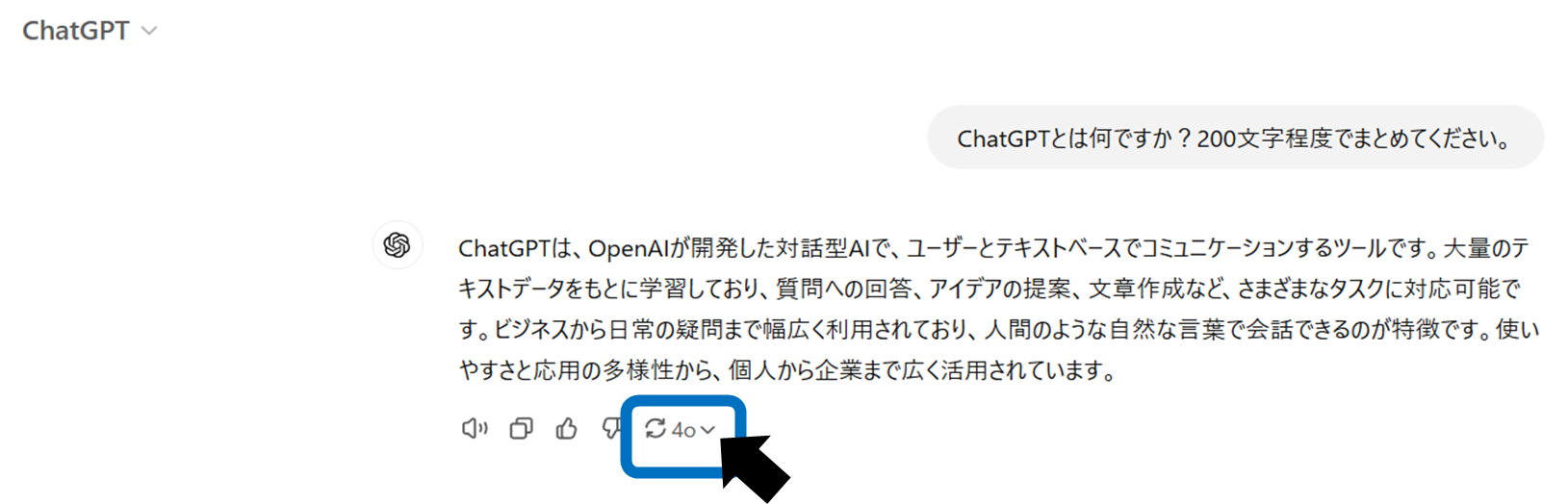
When using ChatGPT from a web browser, there is no function to check in advance which model will be used. However, there is a way to check which model was used to create the answers generated by ChatGPT.
The steps are as follows:
If you hover your cursor over the "model switching icon" at the bottom left of the generated answer, the model being used will be displayed.
When using via API
When using ChatGPT via API, the model ismodelSpecify with parameters. Available models are OpenAIOfficial websitePlease refer to it as it is listed there.
In the API responsemodelFields are included so you can see the model in action. for example,gpt-4oIf you specify , the response will be as follows:modelContains fields.
{
  "model": "gpt-4o",
  // その他のレスポンスデータ
}
modelIf no parameters are specified, the default model is used. The default model may change due to OpenAI updates, so always check for the latest information.
summary
The method to check the ChatGPT version differs depending on whether you are using the API or a web browser.When using a web browser, check the model name after generating the answer.Or refer to OpenAI's official announcement.When using API, use model parameters and responsesto see which version you are using. By using the latest version, you can take full advantage of ChatGPT's features and get more effective results.