OpenAI's ChatGPT provides an "image library" function that allows you to automatically save and manage generated images. This function is very useful when you want to review the entire image later in a list, or when you want to re-edit or reuse it later, without having to save or download it each time you generate an image.
In this article, we will explain in detail the basic usage of the image library and how to delete images.
table of contents
Image library overview
Images generated with ChatGPT are automatically saved in the "Library". This results inEasily view and reuse images created in the pastis. The library can be accessed from the sidebar of the web version and iOS/Android app.
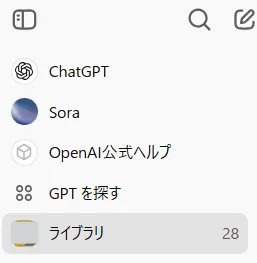
Inside the library, you can:
edit
Select an image and enter the prompts to edit.
keep
Download images to your device.
share
Share with other apps and services.
copy
Copy image to clipboard.
These features make image management easier.
How to delete images
Currently, we do not provide the ability to delete individual images from your image library.To delete an image, you must delete the conversation itself that generated the image.
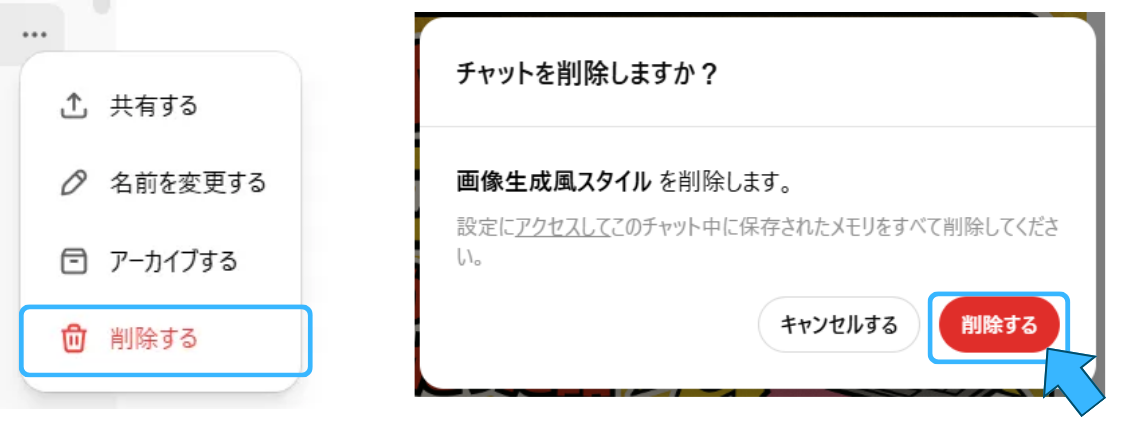
Deletion procedure on the web version
Hover over the conversation title in the ChatGPT sidebar. Click the “…” menu that appears.
Select "Delete" and click "Delete" again in the confirmation dialog.
Removal instructions on mobile app
In the app's sidebar, tap and hold the conversation title. Tap "Delete" from the menu that appears.
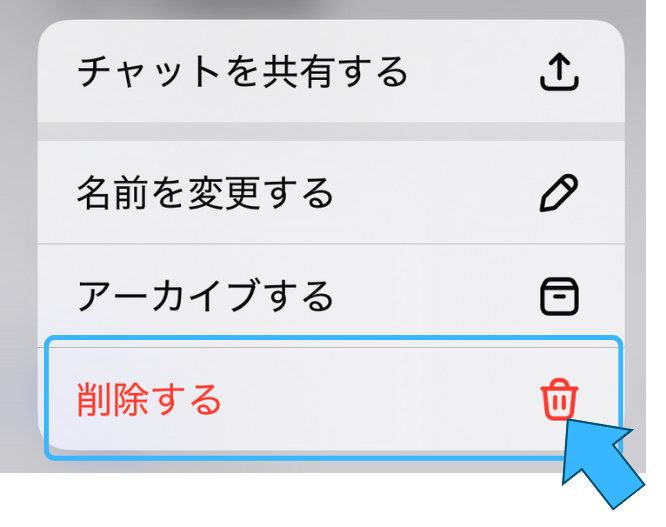
These actions will remove the conversation and the images generated within it from your library.
Points to note when using the library
ChatGPT's image library is a convenient feature that allows you to centrally manage generated images. However, there are some caveats.
Displayed in the library are:Only images created with the image generation function of GPT-4ois.
Images generated with older versions of DALL·E will not be displayed in the library.
Images created in the past are added to the library one by one, soMay not appear immediately.
To delete an image, you must delete the entire conversation.
summary
ChatGPT's image library is automatically saved and managed every time an image is generated, so it is a very convenient feature for reviewing, re-editing, and reusing images later. This will greatly improve work efficiency, especially for users who use images on a daily basis.
On the other hand, please note that the displayed images are limited to those generated by GPT-4o, and that deleting images requires operations for each conversation. If you understand and utilize these features, you should be able to enjoy a more comfortable image generation experience.