
“Where did the ideas we exchanged earlier go?”
What is helpful in such cases isChat history searchIt's a function. Just by typing in a keyword, you can instantly recall past conversations, greatly reducing the effort of re-searching.
In this article, we will explain how to use ChatGPT's "chat history search" function and the key points to utilize it.
table of contents
Search operation procedure in browser version
If you are using ChatGPT on a PC browser, you can easily search for past conversations by following the steps below.
【procedure】
After logging in to ChatGPT, you can find it in the sidebar on the left side of the screen.magnifying glass iconClick. For keyboard operationCtrl+K (Windows)/Cmd+K (Mac)But a search bar will open.

Then enter any keyword or phrase that comes to mind in the search bar.The search is an exact match, so be as specific as possibleThat's the point.
From the list of suggested threads, click on the one you want to immediately check past conversations. Both the thread title and body are searched.
This search feature is very useful for double-checking information or leveraging past answers.
[Content not searched](Things that don't come up when searched)
Image/file upload
Canvas board
deleted message
Note that these are not indexed.
How to search on the mobile app version (iOS/Android)
Log in to the app. top left of the screensearch barTap.
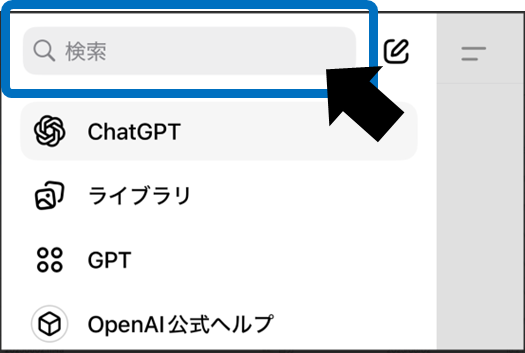
Enter a keyword and select the relevant thread. This tooExact match searchis. If you are vaguely remembering the word, it is easier to get a hit if you try multiple words.
Practical points to improve usage accuracy
In order to use the search function effectively, it is important to keep in mind several points. Below we have compiled some of the most practical tips.
Can be searched instantly
It will be indexed within a few minutes after the conversation ends. This allows the most recent interaction to be immediately included in the search.
Searchable even if archived
It will be hit even if it is not displayed in the sidebar. A convenient feature is that you can easily call hidden threads.
Delete = Not searchable
Threads placed in the trash can also disappear from the index. Since it won't be searched, you can feel safe about your privacy.
Be specific about keywords
If you include terms that can be narrowed down, such as "April 2025 Bill" rather than "Bill", the accuracy rate will increase significantly.
Be careful of history bloat
Sorting out unnecessary threads on a monthly basis will improve search accuracy. Regular tidying up will lead to smooth operations.
Every point is something you can put into practice right away. With a few simple tweaks, your search experience can become much more pleasant.
Privacy and data retention
ChatGPT chat history is typically indexed within 30 days and stored securely on OpenAI's servers.will be done. user creates a threaddeleteThe content will then be immediately removed from the search index and permanently deleted from the server after a certain period of time. Retention periods may vary depending on your organization's policies, so please check your internal guidelines if necessary.
summary
Ctrl+K / Cmd+K on PC, search bar on top left on mobileis the starting point
Because it is an exact match search“Specific keywords” are the key
Protect your privacy by deleting the history you want to erase
Being able to easily reuse past responses will speed up prompt creation and research. Please take advantage of it today!