
In order to continue to use generated AI safely in business, it is important to understand the management of account identification information, selection of authentication methods, data handling (export, audit, retention), and procedures for withdrawal as part of the "operational design."
Anthropic (Claude) has clearly defined specifications that are directly linked to operations, such as whether or not email addresses and phone numbers can be changed, whether or not passwords are available, and the scope of SSO (single sign-on) support.
In this article, we will summarize the main points of Claude's account and security operations based on the latest official help, and explain the design points to avoid getting confused in practice.
table of contents
- table of contents
- Account identification information management policy
- Basic design of authentication method and access control
- Authentication via email link (passwordless method)
- Control by SSO (Enterprise feature)
- Data management features by plan
- Session management and logout of all terminals
- Points to note when deleting and canceling your account
- Operational standards that should be established before implementation
- Issues that often occur in practice and countermeasures
- summary
Account identification information management policy
First of all, if you understand what can and cannot be changed, you will not be able to deviate from the design of subsequent processes.
email address
No changes can be made at this time. If necessary, we will respond by canceling your subscription → exporting data → deleting your account → creating a new one. We recommend starting with an email that can be accessed on a long-term basis.
telephone number
Once authenticated, it cannot be changed. It is a prerequisite that you register a number that can be used continuously.
Based on the above premise, confirming the "sustainability" of email/telephone services at the time of introduction will directly lead to avoiding problems later on.
Basic design of authentication method and access control
Once you understand the concept of authentication, it will be easier to take measures against account leakage and design internal controls.
Authentication via email link (passwordless method)
Claude's default method is to log in using an email link without using a password.is. In other words, there is currently no concept of additional password settings. Establishing a robust email receiving environment (measures against spam email and email protection) is the key in practice.
Conversation data will not be used for external learning by default (with the exception of some cases related to sending feedback and safety reviews). If necessary, it would be a good idea to clearly state the handling in your company guidelines.
The above is the basic behavior common to individuals and paid individual plans.
Control by SSO (Enterprise feature)
Claude for Work Enterprise configures domain authentication, JIT provisioning, etc. based on SSO (Okta/Google Workspace, etc.)can. By “forcing” SSO, you can prevent logins using “Continue with email” on the app, and control access to organizational domains. Depending on the setting policy,Existing personal accounts that have not been added to SSO become inaccessiblePlease note (the account itself will not be deleted).
SSO linkage and “parent organization” handling on the API Console side is also provided. It can also be designed to share the same SSO settings as Claude for Work.
It is safe for organizations implementing SSO to make everyone aware of ``who is under SSO'' before the transition, and to instruct them to save and export conversation history if necessary.
Data management features by plan
Data export, tracking, and erasure policies vary depending on the plan.
Function/Item | Individual (Free/Pro/Max) | Team (main owner) | Enterprise (Primary Owner/Owner) |
|---|---|---|---|
Data export (conversation/user information) | Available (Web/Desktop Settings > Privacy) | Available (same as above) | Export organization data (Settings > Data Management) |
Audit log export | ― | ― | Available (aggregated data for the past 180 days, link valid for 24 hours) |
Custom data retention settings | ― | ― | Available (minimum 30 days, Settings > Data Management) |
Export from mobile app | Not compatible | Not compatible | Not compatible |
of exportDownload link will be sent via email and expires in 24 hoursI will. The audit log is limited to Enterprise and mainly contains identifiers, etc., rather than the main text of the conversation (the main text is handled on the data export side).
Session management and logout of all terminals
Isolation of authentication information enables immediate response as an "initial response in the event of an accident."
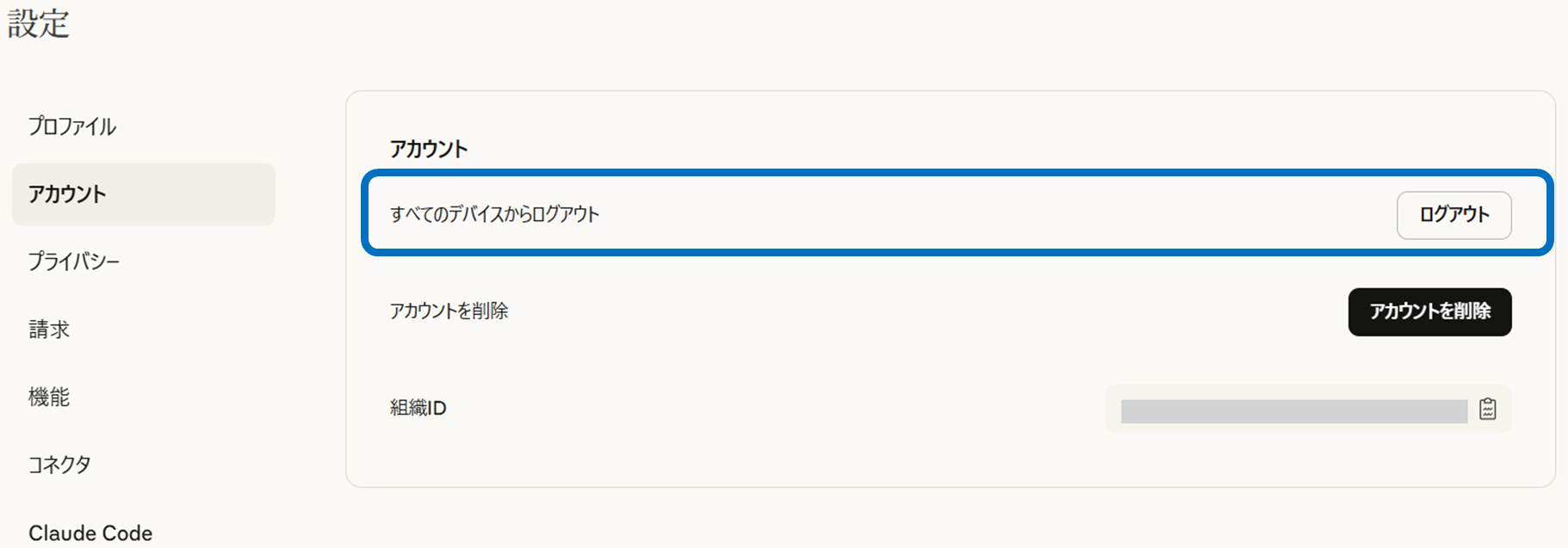
Logout of all terminalsis executed from the web settings (mobile app is not supported). Executing this will immediately sign you out of all web/mobile/desktop clients. This is useful as an initial response in case of suspicious behavior. *To access your account again, you will need to re-authenticate using an email link, etc.
In the unlikely event of an incident, it is safe to write down the steps in your in-house runbook so that anyone can reproduce them.
Points to note when deleting and canceling your account
The “withdrawal flow” branches depending on the billing status.
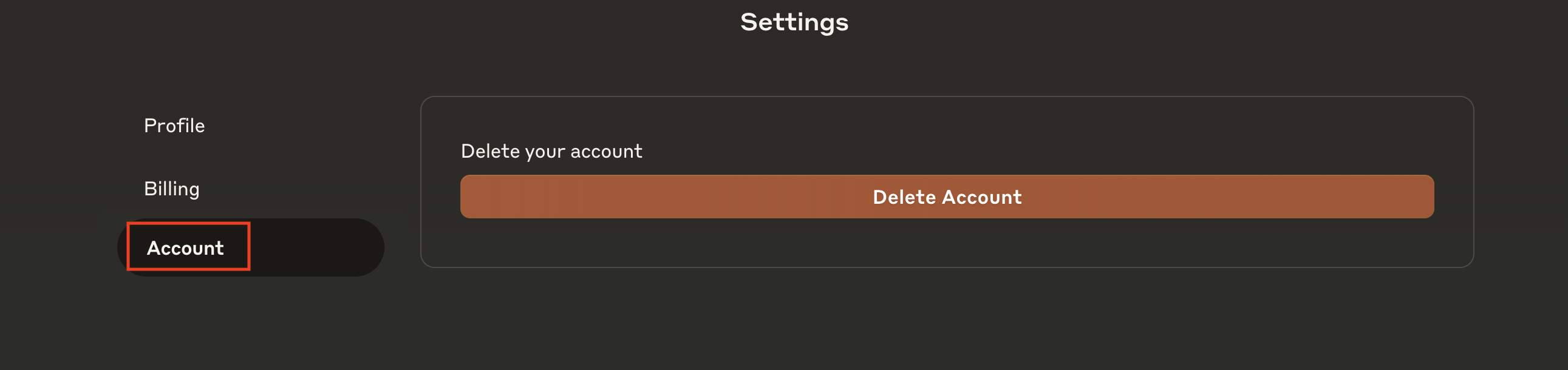
For paid (Pro/Max),Cancel subscription in billing settings → wait for billing period to end → deleteProceed in that order.Deletion is permanent and you cannot return to saved chats. We recommend data export before deletion. In cases where "Contact support" is displayed on the screen, we will respond via support.
Quote:https://support.anthropic.com/ja/articles/9028421-claudeアカウントを削除するにはどうすればよいですか
Additionally, API Console accounts currently do not support self-service deletion, and users in the administrator role must request support to delete them.
Operational standards that should be established before implementation
In order to stabilize operations, deciding where to draw the lines before implementation will prevent rework later.
Identity design
Start using addresses and numbers that can be used for a long time, assuming that email/telephone calls cannot be changed (for organizational accounts, use job titles and general contact points, etc.).
SSO migration policy
Notify who to put under SSO, when to enable enforcement, and data handling (save/export) for non-SSO users.
Data management standards
Stipulate the storage location and access rights for exports, the retention period (≥30 days) for Enterprise, and the retrieval frequency of audit logs (up to 180 days).
Incident response
Define logging out of all terminals at the time of suspicious login as the initial responseand prepare procedures with captures so that relevant parties can immediately implement them.
If these are determined and documented at the outset, control after expanded use will become much smoother.
Issues that often occur in practice and countermeasures
We will proactively overcome the stumbling blocks that occur frequently in practice.
Retired employee's personal account problem
Enabling SSO enforcement may prevent you from accessing your personal Free/Pro/Max accounts. Implementation of migration announcement and export guidance “before enforcement”.
Mobile-based operation
Data export is not mobile compatible, so the procedure is defined assuming work on the web/desktop.
Thoughts about “adding a password”:
Claude requires email link authentication. Since two-step password protection is not possible, security on the email side (IdP with MFA, email protection) has been strengthened.
Small design mistakes tend to result in major rework later on. Let's crush it at the requirements definition stage.
summary
Claude's account operations are based on the premise that email/phone numbers cannot be changed, and combine email link authentication and SSO control (as necessary) to achieve both safety and convenience. Data is exported and Enterprise provides visibility with retention controls and audit logs. When canceling your membership, don't forget to stop billing, expire, delete, and export.
Start by taking stock of your company's current situation (which plan, who uses which authentication, and how much data to retain) and incorporate SSO migration and data policies into operational regulations. Since the specifications and screens will be updated, it is safe to check the latest official help before implementation.