
``I want to quickly share the answers I created with Gemini as internal documents or via email!'' The ability to export answers to external services responds to such needs. It can be used for a wide variety of tasks, such as documenting minutes or drafting emails. However, the export destination service has its own terms of use and disclosure scope, and depending on the content, there is a risk of information leakage.
In this article, we will introduce how to export Google Docs, Gmail, spreadsheets, and even the code development tools Colab and Replit, along with precautions. Make the most of Gemini's answers safely and increase your work efficiency.
table of contents
Benefits of exporting Gemini answers
Gemini's export functionality greatly increases efficiency in many aspects of your business.. You can easily send the answers you create to external services. This will save you time and help you work more smoothly. Let's take a closer look at how you can actually use it.
When you want to summarize the minutes
By documenting your answers, you can make additions and edits smoothly.
When you want to send as an email draft
Export your answers as a Gmail draft and you're ready to send.
When you want to share company information
By formatting and sharing information in spreadsheets and documents, you can easily see it for everyone and move forward with the project while preventing oversights.
Steps to export answers to Google Workspace
Gemini answers are compatible with Google Docs, Gmail, Google Sheets, etc.I'm doing it. However, if you are logged in with a Google Workspace account, the functions available to you may be limited depending on your organization's settings, so be sure to check your company's policies in advance.
Export to Google Docs
Web version (Gemini web app)
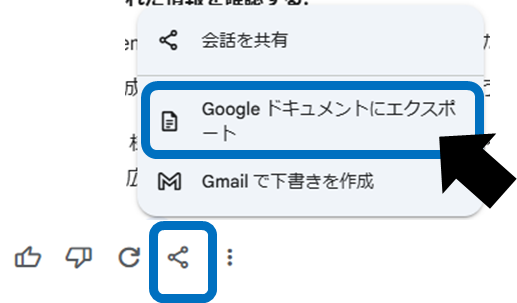
Select the Share & Export icon below your answer and click Export to Google Docs. A new document will then be created in Google Drive, and your answers will be pasted as is.
Mobile version (Gemini app)
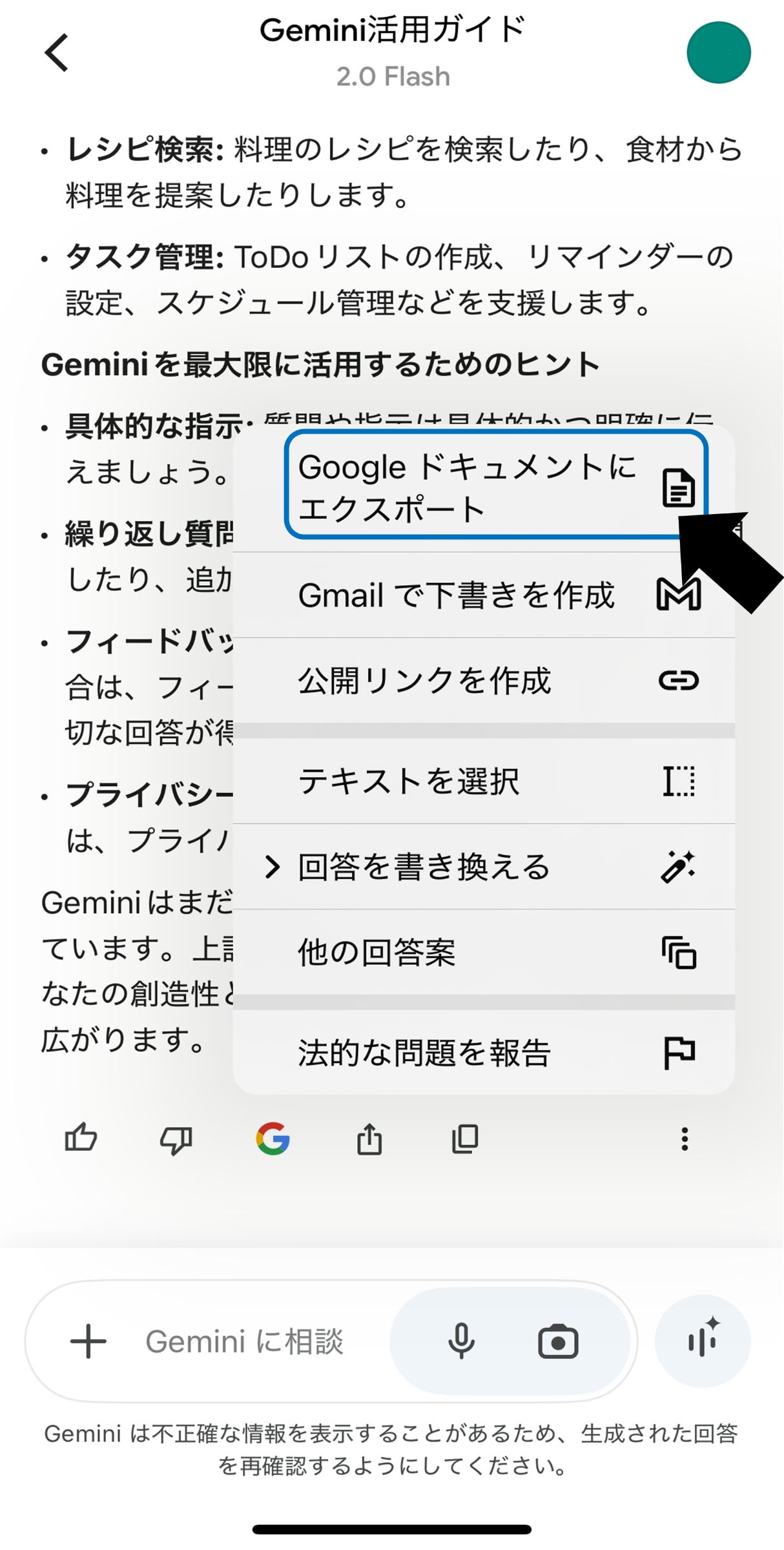
Tap "Export to Google Docs" from the "More icon" below the answer. The rest of the document will be automatically generated in the same way.
This is useful when you want to share the meeting record immediately, or when you want to organize and add the main points and finalize it as minutes or internal documents.
Export to Gmail and create email drafts
Web version (Gemini web app)
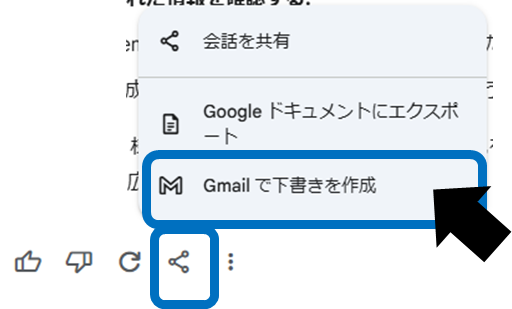
If you select Create draft in Gmail from the Share & Export icon below the answer, a new email draft will be automatically created.
Mobile version (Gemini app)
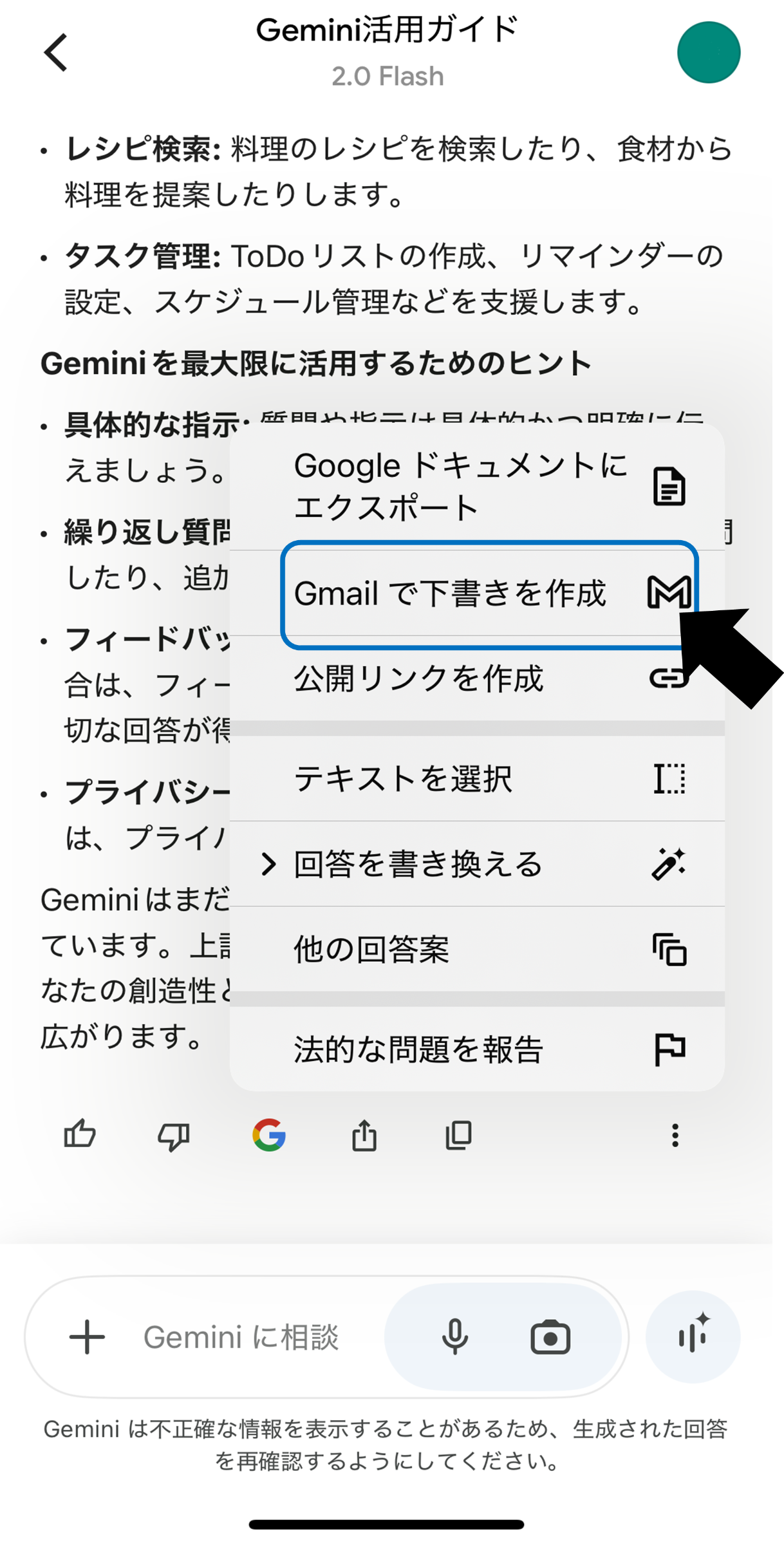
Select "Export to Gmail" from the "Other icon" below the answer, and a draft email will be generated in the same way.
This is useful when you want to immediately send the answers you found using Gemini to your business partners, or when you want to quickly create announcements for internal use. Please note that this feature is only available if you have a Gmail account.
Export to Google Sheets (table data only)
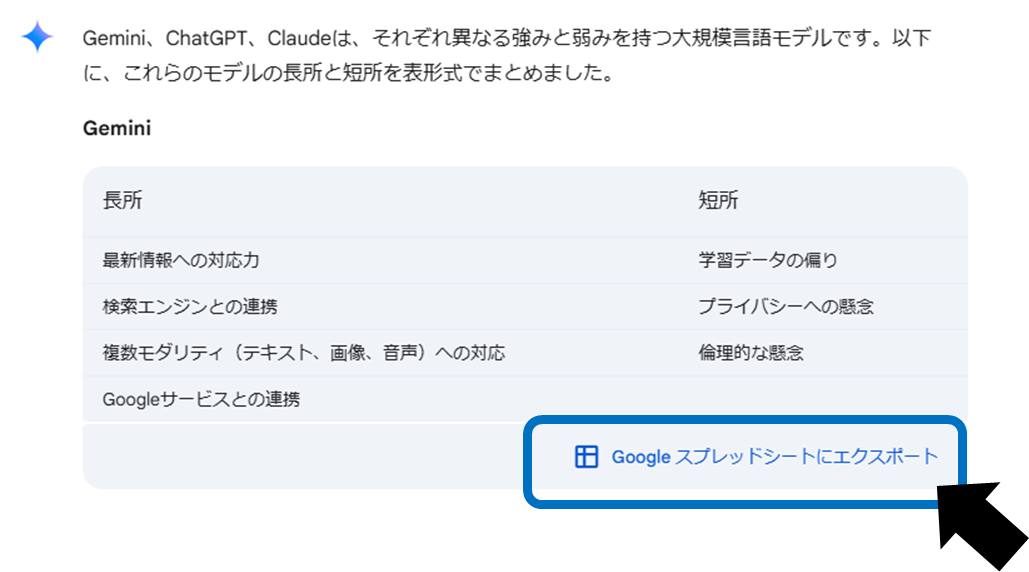
For answers that include tables, you can send them directly to Google Sheets. However, tables containing images are not exported.
Web version (Gemini web app)
If your answer includes a table, you'll see an Export to Google Sheets button in the bottom right corner of the table. Click or tap to generate a new spreadsheet and insert tabular data.
Mobile version (Gemini app)
This feature is currently not supported in mobile apps.
This is useful when you want to further process and analyze numerical data, or when you want to centrally manage lists and aggregated data for internal sharing.
Export code
When Gemini generates code for Python or other programming languages,Google ColaborReplitYou can export directly to developer tools such as It is very useful for actually running the code and doing trial and error, and for using it as a basis for joint development.
Export Python code to Google Colab
Select Export to Colab from the Share & Export icon below your answer to create a new Colab notebook. however,This feature is currently not available with Google Workspace accounts, so consider using it with a personal account..
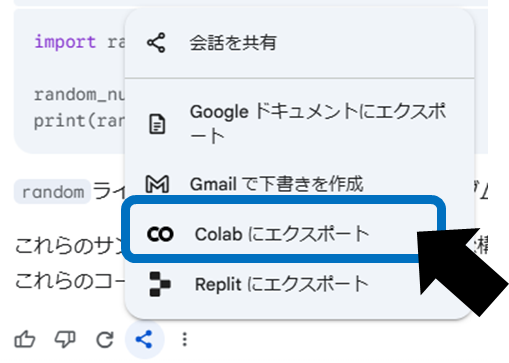
Export to Replit
Click the "Share and Export" icon below the answer → Export to Replit to create your code in a publicly available form on Replit (if you are on the free plan).
A wide range of languages are supported, including C++, JavaScript, and Python, but be sure to check Replit's terms of use and privacy policy when exporting.
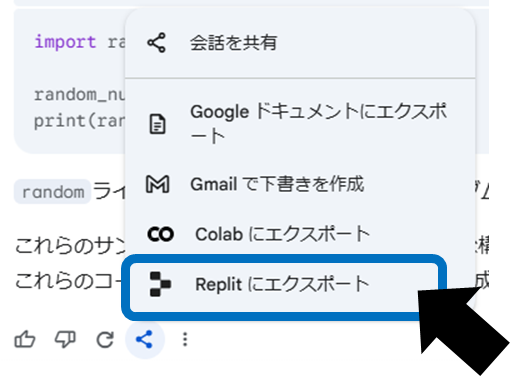
When using a Replit account on the free plan, the code will be made publicly available, so be careful if it contains highly confidential content.is.
Points to note when exporting
Comply with the export destination's terms of use
Content exported from Gemini is subject to the terms and policies of the destination service. Be sure to check the rules for each, such as the scope of data disclosure and whether or not it can be used for secondary purposes.
Check Workspace settings and account status
If you use a Google Workspace account, functionality may be limited by your organization's policies. In particular, Colab export is currently not available for Workspace accounts.
Beware of the risks of data disclosure
Exported content may be viewed by third parties through link sharing or forwarding. When handling confidential or personal information, please do so in accordance with company rules and security policies.
summary
By exporting Gemini responses, you can immediately use them for meeting minutes, email drafts, etc., greatly increasing work efficiency. On the other hand, if you are not aware of the important points regarding the scope of disclosure and terms of use, you may risk unexpected trouble or information leakage.
If you have needs such as ``I want to record meeting minutes,'' ``I want to save time when sending emails,'' or ``I want to share table data and code as is,'' please try the export function introduced this time. Please carefully check the terms of use and internal security policy to maximize Gemini's potential.