
Gemini is an AI tool that can be used for a wide range of purposes, including writing, summarizing, and generating ideas. However, it can sometimes produce inaccurate answers or disappointing output. Why do these problems occur and how can I deal with them?
In this article, we will explore the reasons why Gemini generates inaccurate and inappropriate answers and explain specific methods to resolve the problem. Please read until the end to effectively utilize AI.
If you want to know more about Gemini, please check the article below.
"[What is Gemini? ] Features and usage examples of Google's large-scale language model”
table of contents
- table of contents
- Why Gemini gives inaccurate/inappropriate answers
- Limitations of training data
- Ambiguity in input prompts
- Context limitations
- lack of human-like intuition
- Risks caused by inappropriate responses
- emotional or aggressive response
- Hallucination (hallucination answer)
- Risk of reduced reliability
- What to do if the answer is inaccurate
- Get creative with your prompts
- Check authenticity
- Adjust model settings
- Submit feedback
- Tips to prevent trouble
- How to contact Google Support
- Inquiry procedure
- summary
Why Gemini gives inaccurate/inappropriate answers
There are various reasons why Gemini may give inaccurate or inappropriate answers. Understanding these characteristics is important to effectively utilize AI tools.
Limitations of training data
Gemini learns from large amounts of data and generates answers based on the results. However, if the training data is incomplete or outdated, it will be difficult to generate accurate answers. Also,In certain areas of expertise, we make guesses based on limited data, which can lead to less accuracy..
In the example below, you can see Gemini giving incorrect answers to statistical questions.
Ambiguity in input prompts
AI tools generate answers based on prompts entered by users.Vague instructions or unspecific prompts may cause Gemini to not understand exactly what you mean and give incorrect or incomplete answers..
【example】
Ambiguous prompt: "Show me a better way."
Clear prompt: “Tell me specific ways to improve communication at work.”
Context limitations
Gemini has a limitation called "context window",There is an upper limit to the amount of information that can be processed at once.There is. This can result in choppy or less relevant answers if the prompt is too long or contains multiple questions.
lack of human-like intuition
AI only generates answers based on data, soIt is difficult to fully understand the user's subtle intentions and context.There may be cases. Therefore, answers that may be useful in general situations may feel inappropriate in specific scenarios.
Risks caused by inappropriate responses
Gemini's answers are primarily generated based on data and prompts, but can sometimes be unpredictable. Such cases can cause discomfort and embarrassment to users.
emotional or aggressive response
Some usersCases where Gemini gave unexpectedly emotional responsesis reported. For example, a Reddit post allegedly included an inappropriate response that said, "Please die." This problem may be caused by the behavior of the training data or internal model. Such responses can cause significant mental stress to users, so caution is especially important when using AI in business or educational settings.
Source:Gemini told my brother to DIE??? Threatening response completely irrelevant to the prompt…
Hallucination (hallucination answer)
What is hallucination?AI confidently answers incorrect informationrefers to a phenomenon. This problem is especially common when dealing with information that is difficult to fact-check, and can mislead users and even pose significant risks. Below is a typical example.
Generate fictitious information
There are cases where Gemini creates non-existent papers and statistical data and presents them as accurate information.
【example】
"According to a Harvard University study published in 2023..." a seemingly reliable answer is based on research that doesn't actually exist.misleading answer
In specialized fields such as law and medicine, incorrect information may be presented and users may believe it and make incorrect decisions or actions.
【example】
Generate responses to prompts for medical information that recommend unapproved treatments.
Risk of reduced reliability
Frequent inappropriate responses or hallucinations can undermine the reliability of the entire AI tool. This risk is a big problem, especially when used in places where accuracy is important, such as companies and educational institutions.
Although some of these problems are unavoidable due to the nature of AI tools, the risks can be minimized through ingenuity and appropriate responses on the part of the user. By understanding the background behind inappropriate responses and hallucinations and practicing countermeasures, you can use Gemini more safely and effectively.
What to do if the answer is inaccurate
If you receive an incorrect or inappropriate answer, you can improve accuracy by:
Get creative with your prompts
To get the most out of Gemini, it's important to be specific and clear with your prompts.
[Improvement example]
Ambiguous prompt:"Write a report"
Specific prompt:“Write a summary of your report on marketing strategy in 500 characters or less.”
Additionally, breaking down your questions into smaller questions will help you get more accurate answers.
Check authenticity
Gemini answers are not always accurate. Especially in fields that require specialized knowledge, such as medicine and law, it is important not to take AI's answers at face value, but to confirm them with reliable materials.
example:In fields that require specialized knowledge, such as medical information and legal advice, we recommend that you refer to the opinions of experts rather than relying on AI answers.
Adjust model settings
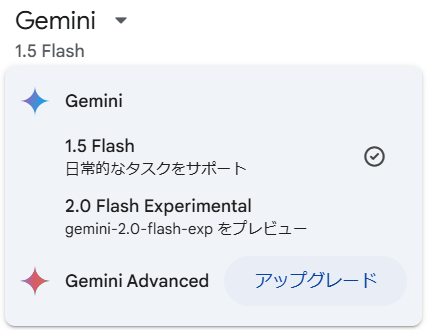
If you want more accurate answers, consider using an advanced model (e.g. Gemini Advanced). This allows for detailed analysis and specific answers.
Submit feedback
If Gemini generates an incorrect answer, you can help improve the AI's accuracy by providing feedback about it. Submitting feedback is easy and can be done using the on-screen options.

Tips to prevent trouble
In order to use Gemini efficiently, there are a few points to keep in mind.
Make your input concise and specific
Answer accuracy will be improved by keeping questions short and avoiding ambiguous expressions.
Split long questions into sections
Prompts with multiple elements can be broken into short questions and answered in sequence to help ensure accurate responses.
Double check the specialized content.
Don't just accept the AI's answer; check it against other sources.
How to contact Google Support
If you are having trouble with Gemini, please contact Google Support.
Inquiry procedure
Google help pageaccess.
Please follow the steps provided in the relevant article. If you cannot find the relevant article or the problem is not solved, please post to the "Help Community" and get a solution.
summary
When Gemini gives incorrect or inappropriate answers, it is often due to limitations in the training data or ambiguity in the input prompt. However, by devising prompts and checking answers, it is possible to use them with increased accuracy.
moreover,You can minimize trouble by always double-checking important information with other sources and contacting Google Support if necessary.. Make your daily work and creative work even more efficient by understanding Gemini's characteristics and using it wisely.