
It takes time to create materials and the first draft of a survey, the appearance of PowerPoint appears inconsistent, and advanced work in Excel becomes dependent on a specific person. To address these inefficiencies, Microsoft has added a new set of features to Microsoft 365 Copilot. These are "Office Agent" and "Agent Mode". By simply conveying your intentions via chat, these tools provide integrated support for generating high-quality presentations and documents, automating multiple processes, and conducting deep research. In this article, we will summarize the overview, features, usage, fees, usage examples, and precautions** of Office Agent and Agent Mode, and introduce tips on how to use them in your work.
table of contents
- table of contents
- What is Microsoft Office Agent?
- A thorough explanation of the main functions of Office Agent and Agent Mode
- Excel - Multi-stage analysis and automatic reporting using Agent Mode
- Word - Interactive document creation with Agent Mode
- Automate and optimize document creation with Office - Agent
- Organizing fees and usage plans
- Image of use in business
- Points to check before introduction
- Precautions when using and risk management
- summary
What is Microsoft Office Agent?
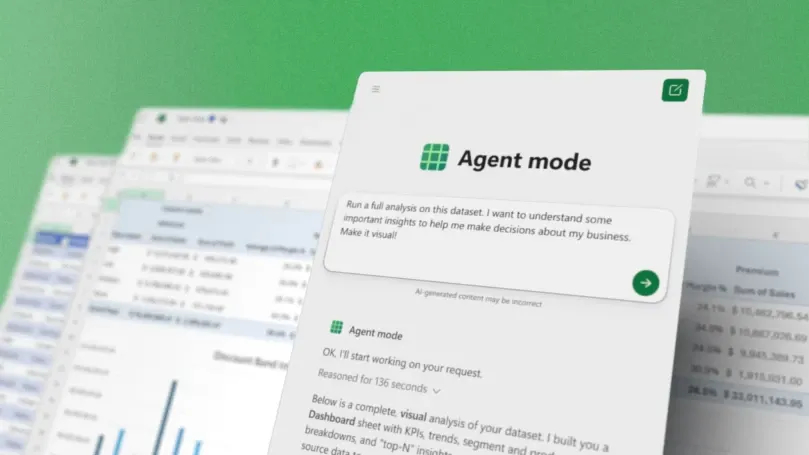
Office Agent is a chat-based content generation agent available within Microsoft 365 Copilotis. Automatically performs everything from intention confirmation to web research, quality checks, and design adjustments for PowerPoint and Word, and generates highly complete deliverables.
Initial deployment will begin with Frontier (early access) in English environments, with plans to expand gradually.
A thorough explanation of the main functions of Office Agent and Agent Mode
Office Agent and Agent Mode are among the most notable generative AI features integrated into Microsoft 365 Copilot. AI supports the operation of office apps such as Excel, Word, and PowerPoint, greatly improving work efficiency. In this chapter,Excel/Word/Office AgentWe will introduce each function and usage scenarios in detail.
Excel - Multi-stage analysis and automatic reporting using Agent Mode
It is possible to autonomously proceed with multiple processes on Excel and complete a report while repeating analysis, verification, and visualization.Excel Agent Modeis.
Analysis and visualization from conversations
When you enter "visualize this sales data to generate insights that can help make decisions," the AI selects a function, creates a sheet, and generates a graph. A summary of the execution details is automatically presented.
Results validation and self-correction
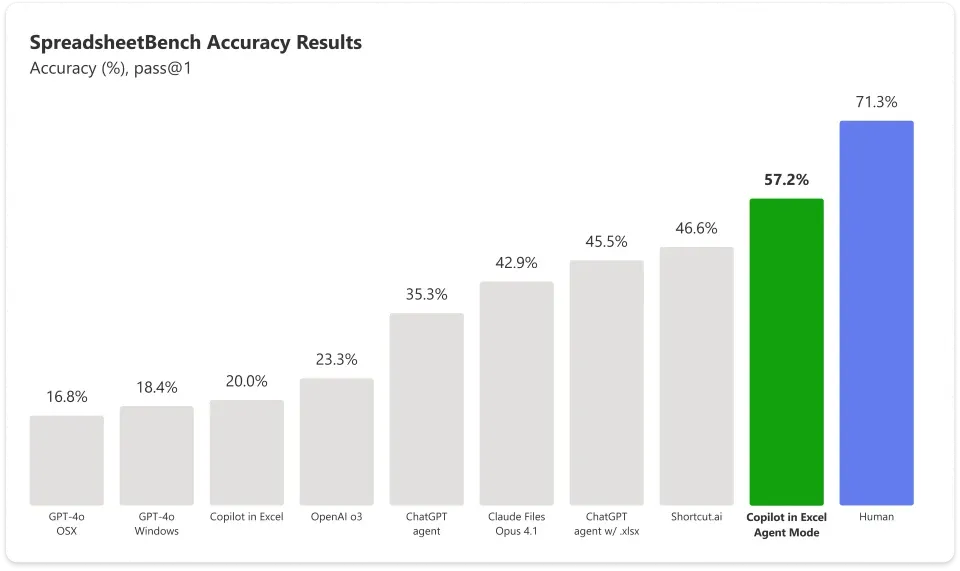
It has a "validation loop" that evaluates the output and retries until it meets your intent. Microsoft's public benchmark "SpreadsheetBench"57.2% correct answer rateis being recorded.
example prompt
Compatible with monthly financial spreadsheets, loan repayment simulators, expense trackers with conditional formatting, and more.
Operational notes
Currently works only within an open workbook. There is no access to other files or external searches, and management with version history and Undo is recommended.
This feature is more than a single task.Work that includes multiple steps from aggregation to visualizationIt is particularly effective.
Quote:Microsoft 365 official YouTube
Word - Interactive document creation with Agent Mode
Word's Agent Mode allows you to create, edit, and unify the format of documents.Proceed in conversational styleYou can.
Document construction through dialogue
You can tell it to "summarize customer feedback and highlight key trends," and it will automatically draft, refine, and format your text.
Collaboration with data at hand
Browse through open documents and attachments to reflect the elements you want.
example prompt
Monthly report updates, management report summaries, unified formatting that matches the brand tone, etc.
Word Agent Mode not only improves the speed of document creation, but alsoIterative review and correction workmake it more efficient.
Quote:Microsoft 365 official YouTube
Automate and optimize document creation with Office - Agent
Office Agent, which runs on Copilot Chat, can handle proposals and presentation materials.Automatically generates everything from listening to the intention to the final formI will.
Complete documents from chat
When you enter "Create a 5-page proposal document summarizing trends in the athleisure market," AI organizes the requirements, conducts web research, and automatically generates the structure and design.
Taste-Driven Development (TDD)
Learn Microsoft's in-house high-quality document design to ensure aesthetics and consistency. We use a mechanism to generate it based on HTML5 and convert it to PowerPoint format.
Multi-agent configuration
With Anthropic's large-scale model as the core, multiple agents work together to share planning, drafting, and improvement. Increase accuracy through inference visualization and self-verification.
example prompt
Store opening plans, welfare system explanation slides, SNS advertising reports, etc.
Office Agent eliminates “starting from an empty slide” andComplete the structure, basis, and design as oneWe have implemented a system.
Quote:Microsoft 365 official YouTube
Organizing fees and usage plans
In order to understand the starting point for implementation, the table below compares "Estimated monthly fee" and "Access status to Office Agent/Agent Mode." (Price is an example of US public price)
plan | Monthly (US) | Scope of use |
|---|---|---|
Microsoft 365 Premium (individual) | $19.99 | Office Agent and Agent Mode (Excel/Word) can be used with Frontier. |
Microsoft 365 Personal / Family | $9.99 / $12.99 | Targeted at Frontier. Experimental features available. |
Microsoft 365 Copilot (commercial add-on) | $30/user (paid annually) | Started using Agent Mode (Excel/Word) on Frontier. |
In the early daysUnited States/English environmentWe plan to gradually expand the offer in Japan.
Image of use in business
We will give specific examples of use in business from the scenarios introduced on the official blog.
New store opening plan (restaurant business)
Based on the budget and permit conditions, we generated an 8-page proposal document.
Welfare system explanatory materials (for internal use)
An overview of the contribution system is organized in graph/story format.
Marketing report (consumer goods)
Automatic reporting of trends in SNS advertising and influencer measures.
These use cases also show that it is practical to use AI to generate the first draft and finish it by humans.
Points to check before introduction
When proceeding with implementation or trial operation, it is best to check the following points for peace of mind.
License type
Clarify whether it is a personal plan or a commercial add-on, and organize the contract scope.
Data protection and privacy
Copilot has a policy of not using user data for AI learning. Match the scope of use to company regulations.
Copyright policy
Understand the scope of Customer Copyright Commitment (Intellectual Property Coverage).
Quality control flow
Incorporate a process to review and verify automatically generated results into the operational design.
Precautions when using and risk management
Office Agent and Agent Mode are new features that continue to be rolled out gradually.
Currently in Frontier preview stage, mainly English UIis.
Also,When citing external information, clearly indicate the source and comply with copyright policy.Must be.
Please check the official Microsoft blog regularly for feature updates and target expansions.
Rather than just using the artifacts generated by AI,Use with the premise of final check by a personThis helps maintain quality and reliability.
summary
Office Agent is unique in that it allows you to research, compose, generate, and check quality in an integrated manner from Copilot Chat, allowing you to create sophisticated documents in a short time. On the other hand, Agent Mode for Excel and Word automates multi-step tasks within each app and streamlines the flow of analysis and editing. In the future, regional and language support will expand, and it will become possible to use it in even more business situations.
First, check the availability with Frontier and consider actual operation that combines AI automation and human verification.